
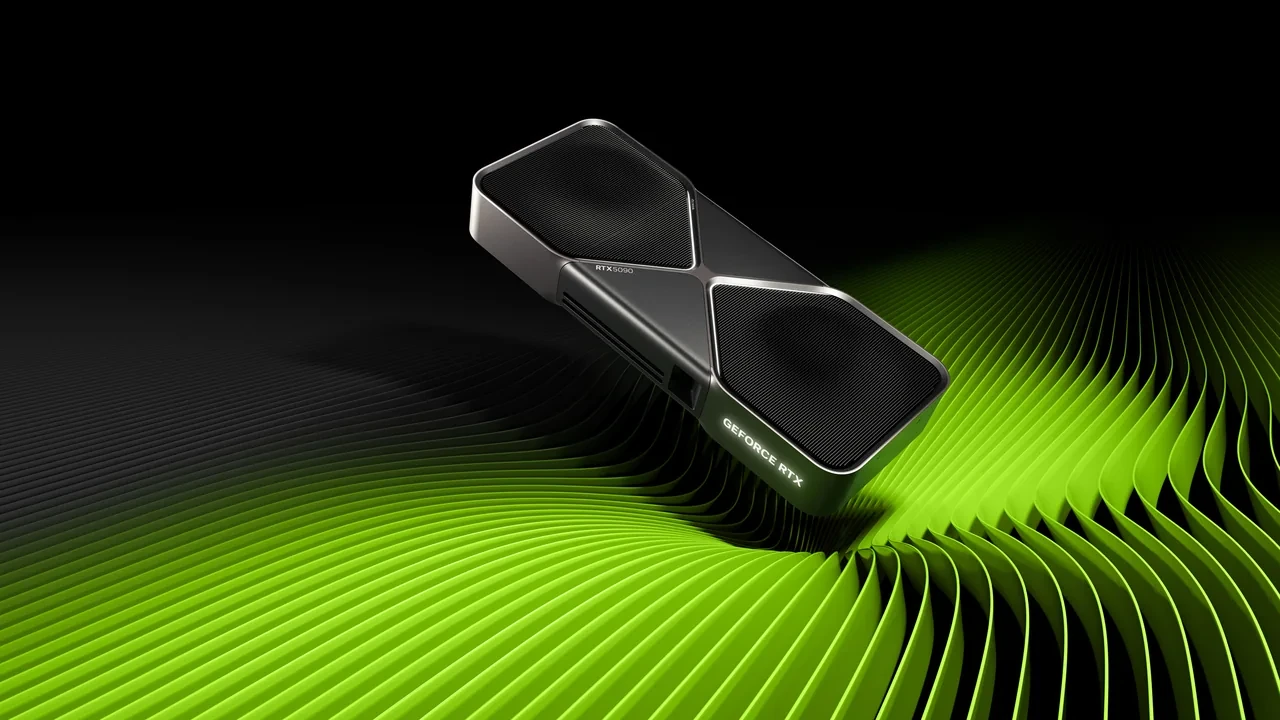
GeForce RTX 5090 DLSS 5 best settings for image quality and latency
There is no single best preset. DLSS 5 combines a neural renderer with Super Resolution, Frame Generation, and Ray Reconstruction, and each component affects image stability, pacing, and end-to-end latency differently. A pixel-accurate capture, a 240 Hz competitive match, and a cinematic game with dense ray-traced lighting need different configurations.
Recommendations remain launch-data gated until NVIDIA’s stated release time of 2026-09-03 21:00 PT. Anything written before then is a pre-launch placeholder that must be checked against the public launch driver and SDK. These settings concern desktop GeForce RTX 50 Series boards only, not laptop, Max-Q, Mobile, or SUPER versions, and they do not transfer to RTX 40 or RTX 30 cards.
The intended baseline is reproducible enough for a technical artist, graphics programmer, or technical director to use in build reviews, capture work, and player configuration guides across driver and content updates.
Why the settings now involve four separate modules
DLSS 5 is scheduled to add neural-rendering hooks alongside Super Resolution, Frame Generation, and Ray Reconstruction. Its renderer uses motion vectors, depth, and material properties to recover detail lost through aggressive upscaling. The RTX 5090 can keep higher internal resolutions playable, shifting the balance between native rendering, upscale mode, and generated frames.
Stable motion vectors remain essential, especially when screen-space effects sit above DLSS. New RTX 50 hardware scheduling reduces synthesized-frame cost relative to earlier generations, but base-frame latency still needs Reflex. Ray Reconstruction can also absorb enough denoising work to allow higher ray sample counts without exceeding the budget.
Quality, Balanced, and Performance no longer describe the entire setup. Configure each module independently, then review image quality, pacing, and latency as separate measurements rather than one FPS value.
A desktop RTX 5090 test baseline
Use a recent Studio or Game Ready driver tagged for DLSS 5, a current desktop platform with a 16x PCIe slot, stable power sized for typical board draw, and a 1000 W or higher PSU when paired with a high-end CPU. At least 32 GB of system memory helps prevent CPU-side capture stalls, while an NVMe SSD keeps level streaming out of frame-time traces.
Match the test display to the intended experience. A 4K 120 Hz panel with DisplayPort 2.1a and DSC can show high-resolution Frame Generation output. A 1440p 240 Hz panel favors refresh and latency. A 1080p 360 Hz screen remains valid for competitive testing, although more GPU budget goes toward frame generation than raw shading at that resolution.
| Component | Recommended baseline | Why it matters for DLSS 5 |
|---|---|---|
| Driver | NVIDIA release driver for DLSS 5, dated on or after 2026-09-03 21:00 PT | Pre-launch drivers cannot validate DLSS 5 outputs; only post-launch drivers carry the public model and tuning |
| System memory | 32 GB DDR5 or higher | Prevents CPU-side stutter during capture and reduces frame-time variance when Frame Generation is active |
| Power supply | 1000 W 80+ Gold or higher for desktop RTX 5090 | Maintains boost clocks during sustained ray tracing and Frame Generation workloads |
| Storage | NVMe SSD for engine and capture buffer | Eliminates load-time artifacts that can be mistaken for DLSS image issues |
| Display | DisplayPort 1.4a with DSC, or DP 2.1a where available | Required for 4K at high refresh with HDR and low-latency VRR |
Settings for each DLSS 5 module
Choose each sub-feature according to the engine bottleneck and audience. These defaults apply to a desktop RTX 5090.
| DLSS module | Modes | Primary effect | When to use on RTX 5090 |
|---|---|---|---|
| Super Resolution | Quality, Balanced, Performance, Ultra Performance | Internal render scale multiplier | Use Quality at 4K native for cinematic builds, Balanced at 4K with Frame Generation, Performance at 1440p for high-refresh competitive builds |
| Frame Generation | On, Off | Synthesized intermediate frames | Use On when the base frame rate already meets the studio’s minimum; Off for latency-critical or motion-vector-sensitive scenes |
| Ray Reconstruction | On, Off | Replaces hand-tuned denoisers with neural denoiser | Use On for path-traced and heavy ray-traced scenes; evaluate against a hand-tuned denoiser reference before locking in |
| Neural renderer (DLSS 5) | Quality, Balanced, Performance preset | Detail recovery and stability on top of upscaled or native render | Default to Quality for capture pipelines; Balanced for shipping presets where image quality already passes review |
Starting presets for common workloads
These assume a desktop RTX 5090, the post-launch driver, and an engine integration exposing every module. Test 1080p, 1440p, and 4K against an untreated native reference before shipping any preset.
- Capture and editorial review preset: Super Resolution Quality at native panel resolution, Frame Generation Off, Ray Reconstruction On, DLSS 5 neural renderer Quality. This favors stable, near-native captures for marketing and review.
- Cinematic 4K single-player preset: Super Resolution Balanced at 4K, Frame Generation On, Ray Reconstruction On, DLSS 5 Quality. Recovered budget can support higher ray-traced reflection samples while generated frames smooth the output.
- 1440p high-refresh preset: Super Resolution Performance at 1440p, Frame Generation On, Ray Reconstruction On, DLSS 5 Balanced. It targets 165 to 240 Hz panels, with pacing checked against the variable-refresh window.
- Competitive low-latency preset: Super Resolution Quality at native 1080p or 1440p, Frame Generation Off, Ray Reconstruction Off, DLSS 5 Quality. Reflex manages the remaining queue while the pipeline avoids generated-frame latency.
- Stress-test preset: Super Resolution Ultra Performance at 4K, Frame Generation On, Ray Reconstruction On, DLSS 5 Performance. Use it to test the most aggressive scaling path, not as a player default.
Validate frame pacing and input latency
Synthesized frames can conceal base-frame jitter on the GeForce RTX 50 Series. A target-rate run with 8 ms variance may look smoother than another target-rate run with 4 ms variance when only the former uses Frame Generation, so the counter alone is not enough.
- Capture a 60 second scene with DLSS 5 disabled and retain every frame time as the baseline.
- Repeat the same scene and markers with the target DLSS 5 preset.
- Compare 1 percent and 0.1 percent low frame times, aligning synthesized frames to the same wall-clock points.
- Measure end-to-end latency with a high-speed camera and contact closure. Reflex on versus off should stay within the driver’s published range.
- Provide a per-scene Frame Generation kill switch for cinematics, slow-motion replays, and particle-heavy moments that interpolate poorly.
- Export sub-pixel motion vectors and keep engine TAA from overwriting DLSS input, or transparent effects and camera cuts may ghost.
If a check fails, first disable Frame Generation and repeat the run. If quality still drifts, move Super Resolution one preset step while leaving Ray Reconstruction and the neural renderer enabled. That isolates the module causing the artifact.
Cases where fewer modules work better
The RTX 5090 has enough shading throughput that aggressive upscaling may recover little useful budget while making motion-vector faults more visible. Enable one component at a time, save references, and lock the setup only after image review.
Dense particles can briefly duplicate in synthesized frames. Heavy subsurface scattering may lose artist-authored texture under neural processing. Hand-authored cinematics may not benefit from a second interpretation at all. In each case, simplify the DLSS configuration and let native rendering carry more of the frame.
Engine signals required by DLSS 5
DLSS 5 uses the established DLSS 4 integration points but asks for richer engine data. RTX 50 hardware receives those inputs through NGX and the updated Streamline SDK in custom engines, Unreal Engine 5, and Unity.
- Use an engine plugin compatible with the post-launch SDK; older builds may omit the neural-renderer input node.
- Provide sub-pixel per-pixel motion vectors and prevent TAA from writing into the buffer DLSS reads.
- Supply depth in the SDK’s expected format, including valid skybox and far-clip values. Zero depth can misclassify foreground detail.
- Connect Frame Generation to dynamic engine pacing rather than a fixed cadence so synthesized output follows the base rate.
- Keep Ray Reconstruction separate for direct comparison with the engine’s hand-tuned denoiser.
- Add a CVars or console-command group matching the production preset so dev kits can reproduce it without rebuilding.
A fast fault-isolation order
Most visible failures on a desktop RTX 5090 fall into four categories.
- Ghosting on fast camera cuts: check for the wrong motion-vector buffer or TAA writes into DLSS input. Disable TAA in the affected volume and retest.
- Flickering on thin geometry: verify full-precision depth and geometry thresholds. Raising the near plane and re-exporting depth may fix it.
- Stutter at high frame rates: stabilize the base rate before Frame Generation by profiling CPU work and shader compilation.
- Halos around highlights: the renderer may read tone-mapped pixels as scene detail. Move tone mapping after DLSS or lower the color-grading highlight threshold.
Capture a 5 second clip for each failure and send it through the normal image-review process. If several titles show the same fault, roll back the NVIDIA driver and compare with a known-good build because the problem may sit in the driver or SDK.
Keep every team on one shipping preset
For a single-player RTX 50 title, DLSS 5 should be a default build feature rather than a stretch goal. The RTX 5090 can keep Frame Generation active at 4K with Ray Reconstruction, while the neural renderer lets artists retain a higher base scale. Use one documented preset so QA, marketing, and players do not see different first impressions.
Live-service projects need an extra tier. Set a 1440p minimum on the RTX 5090 and a configurable 1080p minimum on older hardware. The low-end preset is where DLSS 5 has the largest relative detail-recovery effect because its base scale is more aggressive.
Final checks before the preset ships
Run the final review on a desktop RTX 5090 with the post-launch driver. A bad preset creates support tickets, another patch cycle, and the impression of an unfinished feature.
- Capture six scenes: indoor cinematic, outdoor action, UI-heavy menus, dense particles, slow-motion replay, and a benchmark loop.
- Run each at the shipping preset and one step more aggressive; both must pass image review.
- Record a 60 second trace per scene and verify 1 percent and 0.1 percent lows against the pacing budget.
- Measure end-to-end latency at shipping and low-end presets against the input budget.
- Test a driver rollback and forward update so the preset is not tied to one release.
- Confirm exported settings and UI labels match engineering terminology.
Any failure returns the configuration for another pass. The release manager should own the final gate because the preset is part of the shipped product.
Reflex, VSync, G-Sync, and limiters
Reflex should stay enabled with Frame Generation because it shortens the render queue the scheduler assumes. On a variable-refresh panel, VSync off with G-Sync compatible provides the lowest latency. Fixed-refresh displays can use VSync to stop tearing at a small latency cost, while a limiter at native refresh is another option.
A reproducible shipping setup uses Reflex on, VSync off, G-Sync compatible, and a limiter set to panel refresh divided by an integer. That gives generated frames a predictable cadence. Expose Reflex and VSync independently because the correct combination depends on the player’s display.
Record the review with the binary
The handoff record should include GPU, driver, DLSS SDK build, per-scene notes, pacing traces, latency measurements, and the reason for the chosen preset. Without it, lighting or post-process changes cannot be compared with a known-good reference.
A single PDF or Notion page per build can list scenes in order with thumbnails at the shipping preset and one step more aggressive. Producers can spot regressions quickly, and the record pays for itself when a TAA change breaks DLSS input.
Open questions before the public driver
Shipping-title evidence is still missing for volumetric clouds, hair and fur, and screen-space reflections. Ray Reconstruction coverage varies with each engine’s denoisers, and Frame Generation interaction with RTX 50 hardware scheduling has not yet been measured across a representative game range.
Teams committing before the driver can ship the previous-generation preset and add DLSS 5 in a Day 1 patch. Teams able to wait can validate the public driver and include it at initial release. Do not ship a guessed configuration on a pre-launch driver.
Immediate work for a development team
Install the post-launch driver on a desktop RTX 5090 reference system, run the capture suite, select and record one shipping preset, expose every module to QA, and decide whether support lands at launch or through a Day 1 patch.
Assign a named DLSS 5 owner to maintain presets across driver updates and investigate image regressions. Without ownership, configurations drift between builds.
RTX 5090 setup questions
Is DLSS 5 officially supported on the RTX 5090?
Yes. It is supported on desktop GeForce RTX 50 Series hardware including the RTX 5090, but launch data remains gated until 2026-09-03 21:00 PT. Pre-launch settings require validation on the public driver.
Which preset should start a 4K 120 Hz review?
Begin with Super Resolution Balanced, Frame Generation On, Ray Reconstruction On, and neural-renderer Quality. Validate pacing before image quality.
Should competitive games use Frame Generation?
Usually not when base-frame latency affects performance. Keep Super Resolution and the neural renderer at Quality, leave Frame Generation off, and retain Reflex.
How does DLSS 5 work with ray tracing?
The neural renderer and Ray Reconstruction sit beside the existing ray-tracing pipeline. Clean motion vectors and depth let the RTX 5090 use higher samples for reflections and global illumination while neural denoising recovers detail.
Can one preset cover 1080p, 1440p, and 4K?
No. Super Resolution benefit depends on output and internal scale. Use a more aggressive mode at 1080p to keep the internal target reasonable, and a less aggressive one at 4K. One setting across all resolutions often produces poor results.
Why not copy desktop settings to the laptop GPU?
Desktop and laptop RTX 50 products share an architecture family but differ in power, thermals, and sustained clocks. Revalidate every laptop, Max-Q, Mobile, or SUPER configuration.
How should the menu expose DLSS 5?
Offer separate controls for Super Resolution, Frame Generation, Ray Reconstruction, and the neural renderer. A combined preset may help casual players, but QA and advanced users still need direct access.
What does the SDK cost in size and frame time?
It adds a small binary footprint and per-frame compute cost that scales with render resolution. The RTX 5090 can absorb it at 4K, though 8K or very heavy ray tracing may expose it in traces.
Should support ship at launch or in a Day 1 patch?
Ship at launch only after validating the post-launch driver. If testing is limited to a pre-launch build, use a Day 1 patch instead.
What is the minimum supported driver?
Use NVIDIA’s DLSS 5 release driver dated 2026-09-03 21:00 PT. Earlier drivers may expose SDK pieces but cannot validate the public model. Record that launch driver and retest later certified releases.

Leave a Reply